


Blogs
PLC Program Version Management with Multiple Users: Preventing Lost Program Changes


Summary: This blog explains how PLC program version management can help engineering teams manage revisions when multiple engineers support the same machine. It covers how revision history and project comparisons can help identify outdated versions, restore previous project data, troubleshoot changes, and reduce the risk of accidental program overwrites.

In many factories, PLC programs are still managed through manual backups, shared folders, USB drives, or local copies on engineering laptops. While this may seem adequate for day-to-day operations, it creates significant risks when multiple engineers support the same machine.
The Lost Program Change Problem
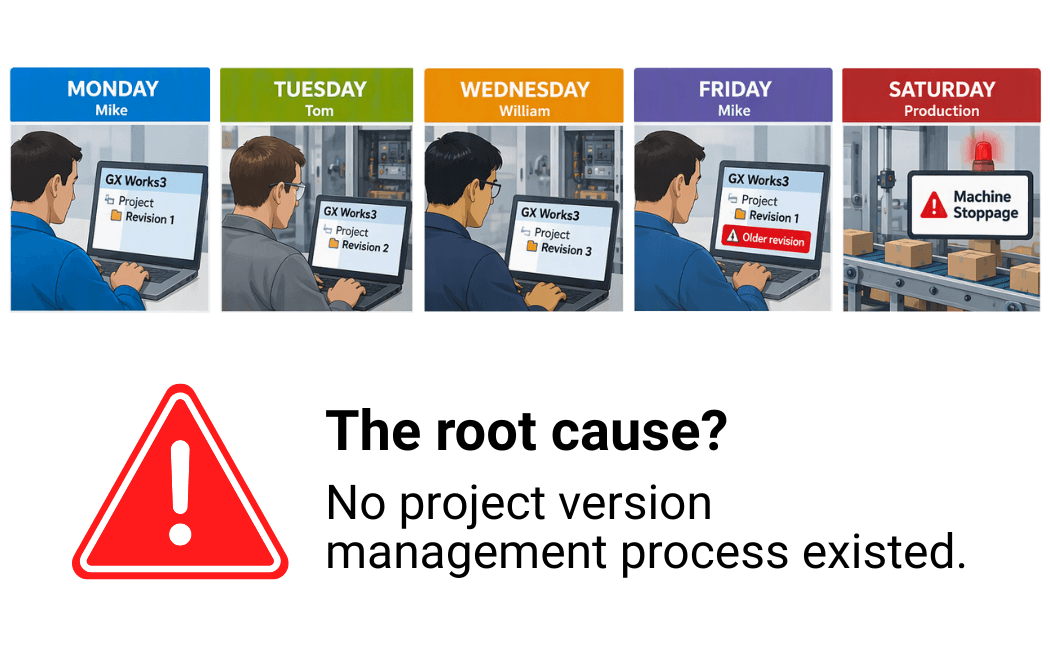
Consider the following real-world scenario.
MONDAY
Mike uploads the latest PLC project from the End-of-Line Test Machine into GX Works3 and begins a major machine improvement project.
Because the work is extensive, Mike spends the entire week developing and testing his changes offline.
TUESDAY
Production encounters a machine stoppage.
Tom investigates the issue and discovers a logic error. Using GX Works3, he modifies the PLC program and downloads the fix directly to the End-of-Line Test Machine. Production resumes running normally.
WEDNESDAY
Production requests a new feature to prevent operator mistakes.
William opens the current PLC program, adds the new logic, validates the functionality, and downloads the changes to the End-of-Line Test Machine.
Everything is working well.
FRIDAY
Mike finishes his project.
He opens the copy of the project he had been working on and performs a PLC write.
Since Mike's copy does not contain Tom's Tuesday fix or William's Wednesday feature enhancement, the download causes those changes to be lost.
Neither Tom nor William realizes that their changes have been lost.
SATURDAY
Production experiences the exact same issue that Tom corrected on Tuesday.
The fix is gone!
Maintenance personnel spend hours troubleshooting a problem that had already been solved earlier in the week.
Production loses valuable runtime, delivery schedules are impacted, and engineering resources are consumed dealing with a preventable issue.
THE ROOT CAUSE
No Project Version Management Process Existed
Why Traditional Project Backups Are Not Enough
Most manufacturers believe they have protection because they periodically save files such as Machine.gx3… Machine_Backup.gx3… Machine_New.gx3… Machine_Final.gx3… Machine_Final_v2.gx3… Machine_Final_v2_Updated.gx3.
The problem is that these files only tell you what versions exist.
They do not tell you:
- When changes were made
- Why changes were made
- Which labels, programs, or FBs were modified
- Whether the PLC currently matches the project file
As machines become more complex, relying on manual file management becomes increasingly risky.
How GX Works3 Project Version Management Helps Prevent PLC Program Overwrites
GX Works3 Project Version Management provides a central location for managing PLC project revisions. Instead of relying on multiple project copies stored throughout the organization, engineers maintain a documented revision history and always know which project version is current.
The original project is registered on the shared network location as the master project.
Mike acquires the current project data from Revision 1 and begins his machine improvement project.
Tom acquires Revision 1, fixes the production issue, and registers a new revision.
Date/Time: Tuesday 10:56:18 AM
Comment: Corrected machine stop logic at station 4
Action: Change Station4POU
William acquires the latest project data, now at Revision 2. After adding the requested feature enhancement, he registers another revision.
Date/Time: Wednesday 3:22:41 PM
Comment: Added sensor validation to loading station
Action: Add SensorCheckPOU
Mike finishes his project and prepares to register his changes. Before writing to the PLC, he can review the revision history and immediately see that additional changes have been made since he acquired Revision 1.
Key Benefit
Every change is documented, traceable, and visible, helping prevent accidental overwrites and ensuring engineers work from the latest approved project revision.
2. Engineers can identify changes before registering a new revision
When Mike prepares to register and deploy his changes on Friday, he can see that newer revisions have been made since he acquired Revision 1 on Monday. His local project is still based on Revision 1, while the latest master project is now Revision 3. Even more detail is indicated next to each data part of his local project, where an icon indicates differences compared to the latest master project revision:
| Icon | Meaning | Description | If executed to master project |
|---|---|---|---|
| (None) | No difference | No difference between local project data and master project data. | No change. |
 |
Change | Local project data is newer than master project data. | This master project data will be updated. |
 |
Old | Local project data is older than master project data. | This master project data will be reverted. |
 |
Conflict | Local project data is older than master project data and changed. | This master project data will be reverted and changed. |
 |
Add | New data added to local project. | This data will be added to master project. |
 |
To be deleted | Deleted local project data. | This data will be deleted from master project. |
 |
Old data to be deleted | Deleted local project data that is older than the master project. | This data will be deleted from master project. |
Now Mike can:
- Review Tom's fix
- Review William's feature update
- Compare logic differences
After reviewing all changes, Mike now merges his specific changes and registers Revision 4.
GX Works3 Project Version Management saves:
- Revision: 4
- Date/Time: Friday 9:39:47 AM
- Comment: New machine cycle optimization
- Action: Change Station1POU, Station2POU, Station3POU, Station4POU
3. GX Works3 compare functions become more effective
GX Works3 already includes project comparison capabilities. Project Version Management gives engineers the revision history needed to put those comparisons into context. They can identify the current revision, see which revision they are working from, and determine whether project data has changed.
This allows engineers to compare project data as part of the normal engineering workflow rather than waiting until a problem occurs.
4. Faster troubleshooting
Imagine the Saturday failure again.
Tom and William follow the project version management process. But Mike fails to follow the project version management process and downloads directly to the PLC. On Saturday, maintenance can immediately compare the PLC program to the revision management history:
| Question | Answer |
|---|---|
| What is the latest revision? | Revision 3 |
| What is the revision of the program in the PLC? | Revision 1 |
| How is the program different from the latest revision? |
Station1POU
Station2POU
Station3POU
Station4POU
SensorCheckPOU
|
| What are the changes from Revision 1 to Revision 3? | Revision 2: Tuesday, corrected machine stop logic at station 4. Revision 3: Wednesday, added sensor validation to loading station |
| Previous version available? | Yes |
With the revision history available, engineers can identify what changed and restore Revision 3 without having to reconstruct the week's changes manually.
The Benefits for GX Works3 Users
A structured version management process can help engineering teams manage PLC program changes when multiple engineers support the same machine.
Prevent Accidental PLC Program Overwrites
Project version management gives engineers visibility into which revision they are working from and whether newer revisions have been registered. This can help identify outdated project data before one engineer's work overwrites changes made by another engineer.
Simplify PLC Program Troubleshooting
Revision history provides a record of what changed between project versions. When an issue occurs, engineers can compare the PLC program with previously registered project data to help determine what changed and restore a previous known-good version.
Manage PLC Projects Across Multiple Engineers
When several engineers support the same machine, Project Version Management provides a shared revision history instead of relying on separate project copies stored on individual computers or in shared folders. Engineers can see which revision is current and review changes made by others before registering their own work.
Maintain PLC Project History
Version management maintains a documented history of project revisions, including when changes were registered and what was changed. This gives engineering teams a record they can reference when troubleshooting or reviewing previous modifications.
Preventing Lost PLC Program Changes
The problem in this story was not Mike, Tom, or William. Each engineer was trying to support production, but they were working from different versions of the GX Works3 project.
Without a structured version-management process, one engineer's project changes can overwrite those made by someone else. GX Works3 Project Version Management enables engineers to track revisions and identify differences before changes are registered in the master project.
PLC program version management helps engineering teams maintain a record of project revisions, identify changes between versions, and reduce the risk of one engineer overwriting another engineer's work. For GX Works3 users, Project Version Management provides a structured way to manage those revisions when multiple engineers support the same PLC program.
A PLC problem does not always come from new code. Sometimes, it is a problem that was already fixed and later overwritten.
Ready to Connect?
Want notifications for new Blogs, White Papers, Case Studies & Webinars?
Contributors

Lee Cheung
Product Manager (HMI)
Mitsubishi Electric US, Industrial Automation


-
Inquiries
-
Build YourQuote
-
Share
-
Partners